
The Webhook integration sends your server a signed HTTP request every time something happens in a conversation — a new message arrives, a reply is sent, a delivery status changes, a reaction is added, or a conversation is assigned or resolved. Instead of polling the API, your system reacts the moment the event happens.
Webhooks are configured per channel. You can attach one or more endpoints to a WhatsApp, Instagram, Telegram, Facebook Messenger, or Webchat channel, each subscribed to whichever events you care about.
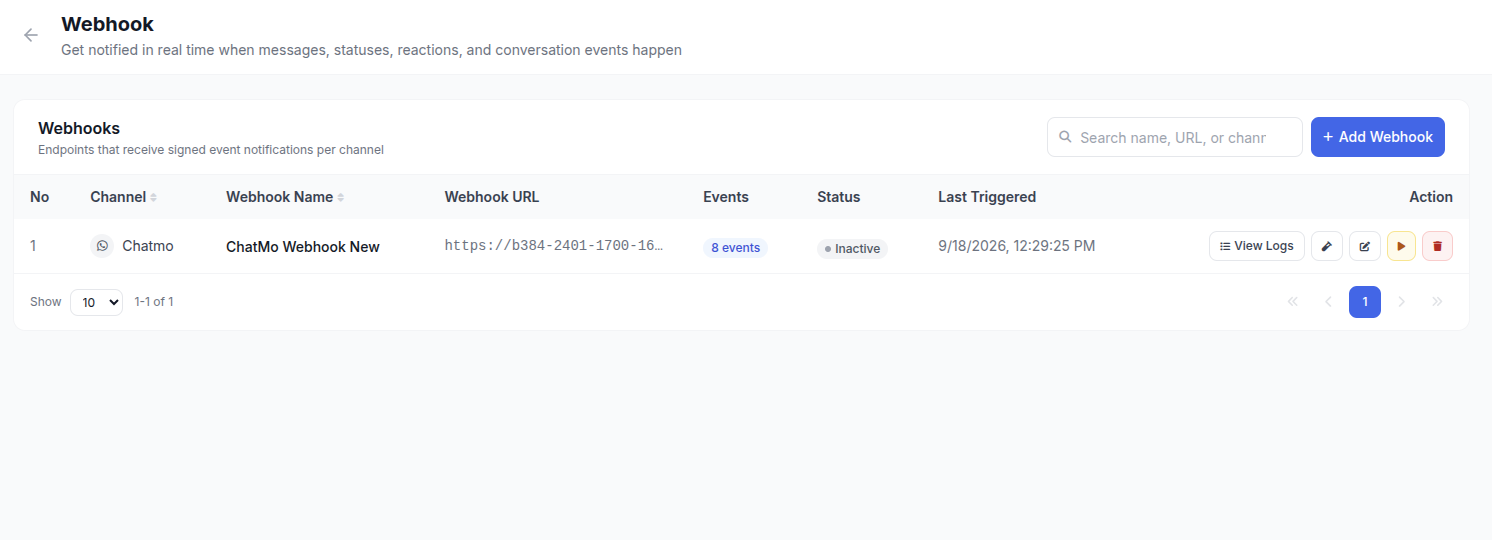
How it works
- You add a webhook endpoint to a channel from Integrations → Webhook, choosing a destination URL and the event types you want to receive.
- When a matching event happens on that channel, Chatmo builds a JSON payload and sends it to your URL as an
HTTP POST, signed with a secret only you and Chatmo know. - Your server verifies the signature, processes the payload, and returns a
2xxresponse. If your server is unreachable or returns an error, Chatmo retries automatically for a while before giving up (see Retries & Delivery Guarantees). - Every delivery attempt — successful or not — is logged and visible from the dashboard, so you can inspect the exact request and response at any time.
:::info Plan requirement Webhook is available on the Professional plan and above. If your organization is on a lower plan, the Webhook card on the Integration page will prompt you to upgrade. :::
What you can build with it
- Sync every inbound and outbound message into your own CRM or data warehouse.
- Trigger an internal alert when a conversation is assigned to a team.
- Close a support ticket in your own system the moment a conversation is resolved in Chatmo.
- Track WhatsApp template approval status changes without polling the API.
- Feed a BI dashboard with delivery/read rates as they happen.
Where to go next
| Page | What it covers |
|---|---|
| Setup | Adding a webhook from the dashboard step by step, and what your receiving server needs to do |
| Events & Payloads | The full list of events, which channels support each, and the exact payload shape per event and channel |
| Security & Reliability | How signing works and how to verify it, plus retries and what happens when your endpoint is slow or down |
| Testing & Sample Code | Sending test events, reading the delivery log, and signature verification in cURL, Node.js, Python, PHP, and Go |
Last modified on